


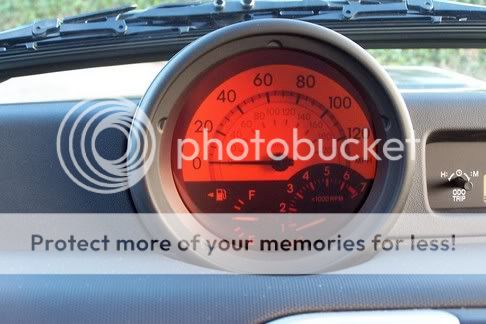
Hot Lava gauge mod (56!)




Thread Starter
Senior Member


SL Member
Joined: May 2004
Posts: 530
From: helafassdooo.com

ok guys, this took me approx. <10 min. & under $1.00, all you need is those colored "cells" for stage lighting, (or for crafts :oops scissor & phillips screwdriver.
Sorry no pics (as of yet, it's a eazy mod)
1.Take off your Gauge cluster cover by removing the plastic screw plug that is hidden above your warning lights. (odometer, temp, brake, brights, etc...) you will need a very small phillips head to fit. after you unscrew, pull the plug out.
2.Start pulling (gentle & steady) the Gauge cluster cover from the corner top lip, & move towards the middle, & towards the bottom. you will hear a "snap" as you go. those are plastic snaps unhooking.
3.After you have removed the Gauge cluster cover, you will need to remove the 3 retaining screws which are located on the L/R side & Top middle of the Gauge cluster.
remove or pull (there is no need of you pulling the electrical connectors off. keep them on.) the Gauge cluster foward out (towards you) in doing this you have access to the "Tabs" that hold the Speedo, glass (plastic), & the Black inner sleeve.
4.Speedo glass & "Black inner sleeve"is held in place by 3 plastic tabs, push the tabs inward, then pull them apart from the Speedo. now you have in your hands the Glass & black inner sleeve together.
5.Now you will need to seperate the Glass & the Black inner sleeve by pressing the "Tabs", then pull apart.
6.Now you can trace either the Glass or Black sleeve (outside edge) on a piece of paper as best you can. this will give you a "Template" to use in sizing & cutting out your Colored Cells. you will need to gauge (pardon the pun) & trim as you need to along the way, in fitting your Cell. keep it close as possible (the Cell needs to be fitted in or sits in the Speedo Glass.(FYI depending on thickness or color of the Cell, you may need to double up on the Cell for a deeper color, especially at night. i doubled mine.)
7.Once you have achieved the fit, (make sure you clean the fingerprints off the cell)put the Black inner sleeve back on. (the Black sleeve pretty much holds the Cell in.) make sure the Cell fits tight, so that the Cell dosn't just fall out.
8.Check the color (for night) & make adjusments before Re-install,
scissor & phillips screwdriver.Sorry no pics (as of yet, it's a eazy mod)
1.Take off your Gauge cluster cover by removing the plastic screw plug that is hidden above your warning lights. (odometer, temp, brake, brights, etc...) you will need a very small phillips head to fit. after you unscrew, pull the plug out.
2.Start pulling (gentle & steady) the Gauge cluster cover from the corner top lip, & move towards the middle, & towards the bottom. you will hear a "snap" as you go. those are plastic snaps unhooking.
3.After you have removed the Gauge cluster cover, you will need to remove the 3 retaining screws which are located on the L/R side & Top middle of the Gauge cluster.
remove or pull (there is no need of you pulling the electrical connectors off. keep them on.) the Gauge cluster foward out (towards you) in doing this you have access to the "Tabs" that hold the Speedo, glass (plastic), & the Black inner sleeve.
4.Speedo glass & "Black inner sleeve"is held in place by 3 plastic tabs, push the tabs inward, then pull them apart from the Speedo. now you have in your hands the Glass & black inner sleeve together.
5.Now you will need to seperate the Glass & the Black inner sleeve by pressing the "Tabs", then pull apart.
6.Now you can trace either the Glass or Black sleeve (outside edge) on a piece of paper as best you can. this will give you a "Template" to use in sizing & cutting out your Colored Cells. you will need to gauge (pardon the pun) & trim as you need to along the way, in fitting your Cell. keep it close as possible (the Cell needs to be fitted in or sits in the Speedo Glass.(FYI depending on thickness or color of the Cell, you may need to double up on the Cell for a deeper color, especially at night. i doubled mine.)
7.Once you have achieved the fit, (make sure you clean the fingerprints off the cell)put the Black inner sleeve back on. (the Black sleeve pretty much holds the Cell in.) make sure the Cell fits tight, so that the Cell dosn't just fall out.
8.Check the color (for night) & make adjusments before Re-install,

Thread Starter
Senior Member
SL Member
Joined: May 2004
Posts: 530
From: helafassdooo.com
Originally Posted by hotbox05
where did u get this "cell"
 the "Cell" @ your local craft store. ie. Micheal's or others. you can buy them in sheets or rolls, price depends on how much you want. i had some left over from i don't know where in my garage.


Thread
Thread Starter
Forum
Replies
Last Post
Docsnuff
Scion xB 1st-Gen Owners Lounge
17
Jan 14, 2004 11:27 PM
