


HowTo Install 06 iPod Head Unit into 05 & earlier Scion


Thread Starter
Member

SL Member
Joined: Jul 2006
Posts: 70
 HowTo Install 06 iPod Head Unit into 05 & earlier Scion
First I’d like to thank Big Kokujin for selling me his Radio to Console Connector cord, Scionlife.com for these great forums, and everyone else (especially Frosty) who have helped me figure out how to complete this mod.
HowTo: Install 2006 Factory iPod Radio into 2005 and older xB,xA,tC
DISCLAIMER: Scionlife.com and ZanexGt do not take any responsibility in what you do to your car. This write-up is most likely filled with incorrect information. You could be voiding your warranty if not installed by a certified mechanic or dealership. It is quite possible that you can totally mess up your car by using this as a guide to install anything. That being said, let’s install a radio!
What You’ll Need:
1. Part Number - 08600-21802 – This is the box that contains the upgraded iPod head unit as well as Part Number which are 2 of the 3 cables you will need to complete the upgrade.
2. If you have just purchased the head unit, you will need to also purchase Part Number PT546-21060. This is a bag that contains 2 of the 3 cables you will need to complete the upgrade. The two cables are the iPod Customer Cord, and the iPod Console Connector Cord.
3. The Radio to Console Connector Cord. Unfortunately, this is a difficult cord to find. In the 2006 model year Scion introduced a few changes to all models. One of the changes included the optional upgraded iPod head unit. However, this head unit utilized a new cord, the Radio to Console Connector Cord that the previous model years did not utilize. Instead of reinventing the wheel and creating a brand new wiring harness, Scion/Toyota took the existing 2005 wiring harness, taped on the brand new piece (the Radio to Console Connector Cord) and gave the whole wiring harness a new part number. Therefore, this cord comes in every 2006 Scion (xA, xB, tC). Here is a picture of the Radio to Console Connector Cord plugged into the back of my 2006 iPod head unit.

4. The big problem with this cord is that there is no individual part number for the cord alone. If you are contemplating doing this upgrade there are only a few ways to get this necessary cord and they are.
I. Befriend a 2006 owner and buy their cord. (This is what I did and I paid $50 for the cord).
II. Find a totaled 2006 Scion in a junk yard and remove the cord yourself. (good luck!)
III. Buy a brand new 2006 wiring harness from the dealer ($1,500) ouch!
Here is a picture of all three cables. Note, the Radio to Console Connector Cord is on the far right, the iPod Console Connector Cord is in the middle, and the iPod Customer Cord is on the left.

5. iPod, any iPod (3G, 4G, Photo, Video, Mini, Nano) with a dock connector and updated firmware. Any firmware after 06/04 will work just fine.
Install Procedure:
1. I used this write-up to guide me in the removal and install of the factory radio. Pay special attention when removing the center console so that the delicate plastic does not break. Here are a few pics from disassembly.


2. After the factory radio is removed the connectors will be hanging out of the center console for you to insert into the new iPod head unit. However, before you hook everything up, this is the point in time where you will need to decide where you’d like your iPod to be stored. For 2006 models, the Console Connector Cord connects on one end to the center console so that the iPod would rest in the open down near the emergency brake. I didn’t like the idea that people looking in my car could see the iPod so I didn’t route my cords this way. Instead, I took out my glove compartment, bundled up / wire tied the excess wire not needed and stored the iPod nicely in the glove compartment. Click Here if you need instructions on how to remove the glove compartment. Now my iPod is out of sight. Another added bonus to this method is that there is no extra cutting needed to store the iPod in this manner.
3. Once you have your wires routed it is time to plug in the iPod head unit to the connectors in the console. You should attach the two harnesses that came out of the original radio into the new iPod head unit as well as the antenna connector. Lastly, attach the iPod to Console Connector Cord into the back of the new iPod head unit. Before putting the screws back into the radio, test the radio for functionality in every mode (AM/FM, CD/MP3, iPod). *Note – It should be possible to retrofit the steering wheel controls out of the 2006.5 into an earlier Scion. The radio works well without the controls but it’d be sure nice to have them. If you were to try to retrofit the steering wheel controls you’d need the 2006.5 steering wheel, steering wheel buttons (if they don’t come w/ the steering wheel), and the cord that connects the head unit to the steering wheel. Unfortunately, I think this was also taped onto the wiring harness and this wire most likely doesn’t have it’s own part number. However, that’s info for another write-up.
4. Lastly, follow the instructions listed in #1 in reverse to reinstall the radio and center dash.
5. Enjoy!
Here are some pictures of the finished product. You can see that the install looks very much like an OEM install.


As you can see below, I had to organize and store the excess cable behind the center console. Using wire ties made this a breeze.


Action Shot!

Closing Remarks:
This upgrade only took me about 30 minutes to complete and I was taking my time as well as taking pictures. The hardest part of this install was finding the Radio to Console Connector Cord. The actual removal and installation of the new radio was quite easy. I chose this route as opposed to the AUX-POD, USA-SPEC, Denium ICE adapters because I wanted text on the head unit to show artist/song info and I didn’t like the playing by play list option of those CD Changer solutions.
Overall Rating:
Installation – 2/10 (Easy)
Sourcing Parts – 8.5/10 (Hard)
HowTo: Install 2006 Factory iPod Radio into 2005 and older xB,xA,tC
DISCLAIMER: Scionlife.com and ZanexGt do not take any responsibility in what you do to your car. This write-up is most likely filled with incorrect information. You could be voiding your warranty if not installed by a certified mechanic or dealership. It is quite possible that you can totally mess up your car by using this as a guide to install anything. That being said, let’s install a radio!
What You’ll Need:
1. Part Number - 08600-21802 – This is the box that contains the upgraded iPod head unit as well as Part Number which are 2 of the 3 cables you will need to complete the upgrade.
2. If you have just purchased the head unit, you will need to also purchase Part Number PT546-21060. This is a bag that contains 2 of the 3 cables you will need to complete the upgrade. The two cables are the iPod Customer Cord, and the iPod Console Connector Cord.
3. The Radio to Console Connector Cord. Unfortunately, this is a difficult cord to find. In the 2006 model year Scion introduced a few changes to all models. One of the changes included the optional upgraded iPod head unit. However, this head unit utilized a new cord, the Radio to Console Connector Cord that the previous model years did not utilize. Instead of reinventing the wheel and creating a brand new wiring harness, Scion/Toyota took the existing 2005 wiring harness, taped on the brand new piece (the Radio to Console Connector Cord) and gave the whole wiring harness a new part number. Therefore, this cord comes in every 2006 Scion (xA, xB, tC). Here is a picture of the Radio to Console Connector Cord plugged into the back of my 2006 iPod head unit.
4. The big problem with this cord is that there is no individual part number for the cord alone. If you are contemplating doing this upgrade there are only a few ways to get this necessary cord and they are.
I. Befriend a 2006 owner and buy their cord. (This is what I did and I paid $50 for the cord).
II. Find a totaled 2006 Scion in a junk yard and remove the cord yourself. (good luck!)
III. Buy a brand new 2006 wiring harness from the dealer ($1,500) ouch!
Here is a picture of all three cables. Note, the Radio to Console Connector Cord is on the far right, the iPod Console Connector Cord is in the middle, and the iPod Customer Cord is on the left.
5. iPod, any iPod (3G, 4G, Photo, Video, Mini, Nano) with a dock connector and updated firmware. Any firmware after 06/04 will work just fine.
Install Procedure:
1. I used this write-up to guide me in the removal and install of the factory radio. Pay special attention when removing the center console so that the delicate plastic does not break. Here are a few pics from disassembly.
2. After the factory radio is removed the connectors will be hanging out of the center console for you to insert into the new iPod head unit. However, before you hook everything up, this is the point in time where you will need to decide where you’d like your iPod to be stored. For 2006 models, the Console Connector Cord connects on one end to the center console so that the iPod would rest in the open down near the emergency brake. I didn’t like the idea that people looking in my car could see the iPod so I didn’t route my cords this way. Instead, I took out my glove compartment, bundled up / wire tied the excess wire not needed and stored the iPod nicely in the glove compartment. Click Here if you need instructions on how to remove the glove compartment. Now my iPod is out of sight. Another added bonus to this method is that there is no extra cutting needed to store the iPod in this manner.
3. Once you have your wires routed it is time to plug in the iPod head unit to the connectors in the console. You should attach the two harnesses that came out of the original radio into the new iPod head unit as well as the antenna connector. Lastly, attach the iPod to Console Connector Cord into the back of the new iPod head unit. Before putting the screws back into the radio, test the radio for functionality in every mode (AM/FM, CD/MP3, iPod). *Note – It should be possible to retrofit the steering wheel controls out of the 2006.5 into an earlier Scion. The radio works well without the controls but it’d be sure nice to have them. If you were to try to retrofit the steering wheel controls you’d need the 2006.5 steering wheel, steering wheel buttons (if they don’t come w/ the steering wheel), and the cord that connects the head unit to the steering wheel. Unfortunately, I think this was also taped onto the wiring harness and this wire most likely doesn’t have it’s own part number. However, that’s info for another write-up.
4. Lastly, follow the instructions listed in #1 in reverse to reinstall the radio and center dash.
5. Enjoy!
Here are some pictures of the finished product. You can see that the install looks very much like an OEM install.
As you can see below, I had to organize and store the excess cable behind the center console. Using wire ties made this a breeze.
Action Shot!
Closing Remarks:
This upgrade only took me about 30 minutes to complete and I was taking my time as well as taking pictures. The hardest part of this install was finding the Radio to Console Connector Cord. The actual removal and installation of the new radio was quite easy. I chose this route as opposed to the AUX-POD, USA-SPEC, Denium ICE adapters because I wanted text on the head unit to show artist/song info and I didn’t like the playing by play list option of those CD Changer solutions.
Overall Rating:
Installation – 2/10 (Easy)
Sourcing Parts – 8.5/10 (Hard)
Thread Starter
Member
SL Member
Joined: Jul 2006
Posts: 70
Here are some more pics realted to the install but not used in the write-up.
1. Side-By-Side pic of the 2006 iPod Head Unit and the 2005 6 Disc CD Changer Head Unit

A Close Up of the Radio to iPod Connector Cord Harnesses.

6+ Feet of cords needed for the iPod laid out in my house

1. Side-By-Side pic of the 2006 iPod Head Unit and the 2005 6 Disc CD Changer Head Unit
A Close Up of the Radio to iPod Connector Cord Harnesses.
6+ Feet of cords needed for the iPod laid out in my house
Thread Starter
Member
SL Member
Joined: Jul 2006
Posts: 70
Originally Posted by tanakasan
Congrats on finding the cable! Enjoy the upgrade! Great write-up...thanks!
Mods/Admin, can we move this to the TECH section so that others may benefit from the writeup?

Junior Member
Joined: Aug 2006
Posts: 4
From: Australia
I just purchased one of these head units from ebay to put in my Toyota Echo and was very sad to find it was missing this cable. I live in Australia so there is no way for me to get a hold of one of these cables (Scion don't exist here), so I am currently in the process of making my own cable using cat5 computer networking cable. Hopefully it works alright, probably not the best solution but it is the only one I have. Anyway, I'll let you know how it goes.


Senior Member

SL Member
Joined: Jul 2006
Posts: 427
From: Northeast USA
Check out my post https://www.scionlife.com/forums/vie...760390#1760390
3 links on the bottom of that post give full 2006 iPod radio wiring diagram and connector pinout. Since this might be useful for future Scionlife readers, maybe a moderator could upload my images to the Scionlife servers for permanant storage.
3 links on the bottom of that post give full 2006 iPod radio wiring diagram and connector pinout. Since this might be useful for future Scionlife readers, maybe a moderator could upload my images to the Scionlife servers for permanant storage.
Junior Member
Joined: Aug 2006
Posts: 4
From: Australia
Yeah, the pinouts are on the forum. I did successfully make the cable but it didn't work. I'm pretty sure there was too much interference on the lines for transmit and receive. I got an ipod comms error come up but the ipod was successfully charging etc. I was using cat5 cable for the data lines. I will have to try some thicker cable. Connecting the cables onto the pins was VERY VERY difficult!!
If anyone does have one of these cables and they are interested in selling please let me know.
If anyone does have one of these cables and they are interested in selling please let me know.

Senior Member

SL Member
Joined: Nov 2005
Posts: 1,282
From: SoCal
Originally Posted by grahamrb
Yeah, the pinouts are on the forum. I did successfully make the cable but it didn't work. I'm pretty sure there was too much interference on the lines for transmit and receive. I got an ipod comms error come up but the ipod was successfully charging etc. I was using cat5 cable for the data lines. I will have to try some thicker cable. Connecting the cables onto the pins was VERY VERY difficult!!
If anyone does have one of these cables and they are interested in selling please let me know.
If anyone does have one of these cables and they are interested in selling please let me know.
I had some occasional comm errors with my older 3G pod. My video and photo (and from what I remember, the 4G) are fine.
Senior Member
SL Member
Joined: Jul 2006
Posts: 427
From: Northeast USA
Originally Posted by grahamrb
Yeah, the pinouts are on the forum. I did successfully make the cable but it didn't work. I'm pretty sure there was too much interference on the lines for transmit and receive. I got an ipod comms error come up but the ipod was successfully charging etc. I was using cat5 cable for the data lines. I will have to try some thicker cable. Connecting the cables onto the pins was VERY VERY difficult!!
If anyone does have one of these cables and they are interested in selling please let me know.
If anyone does have one of these cables and they are interested in selling please let me know.
Come to think of it, USB uses shielded cable. Maybe you could buy a USB extension cable then use it for the shielded connections. That might work as long as you use separate (shielded) cable for the TX and RX, L and R audio, then use standard cable for the remaining connections.
Thread Starter
Member
SL Member
Joined: Jul 2006
Posts: 70
Originally Posted by grahamrb
I just purchased one of these head units from ebay to put in my Toyota Echo and was very sad to find it was missing this cable. I live in Australia so there is no way for me to get a hold of one of these cables (Scion don't exist here), so I am currently in the process of making my own cable using cat5 computer networking cable. Hopefully it works alright, probably not the best solution but it is the only one I have. Anyway, I'll let you know how it goes.
Wiring the cable yourself may prove to be quite tricky. Take a look at this pick (courtesy of Tomas)
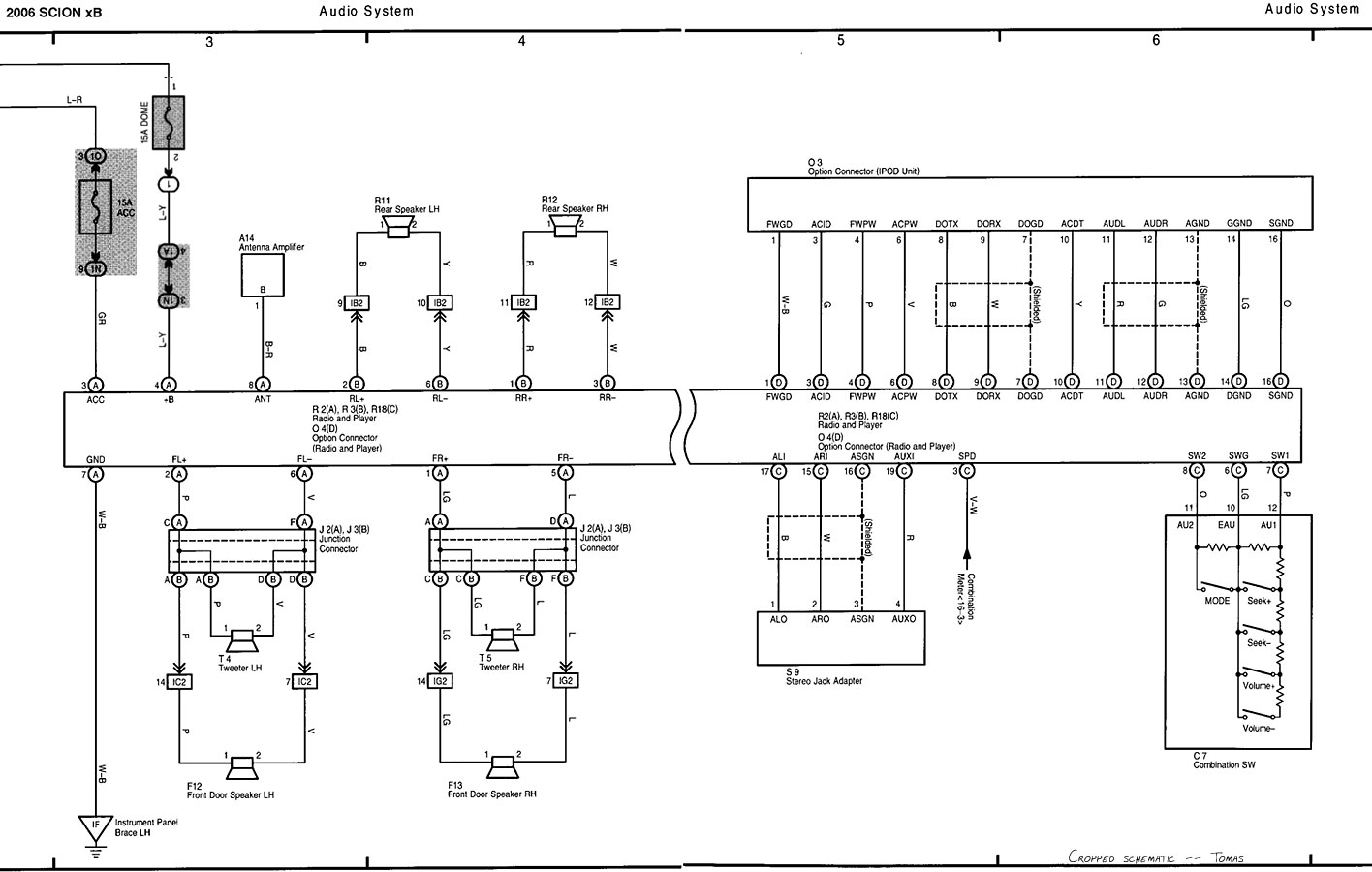
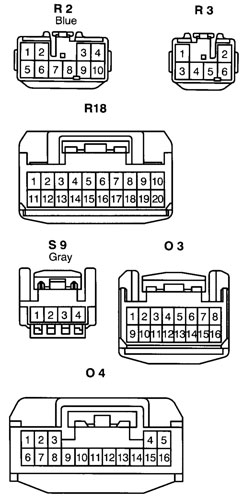
As you can see, the iPod communication wires (DOTX, DORX, DOGD) as well as the Audio output wires (AUDL, AUDR, AGND) are shielded cables. Now, utilizing a USB cable may work if the wires are shielded enough. It is my guess that the guys in this thread that have had errors probably had it wired properly but there was too much interference from the non-shielded cables.
Thread Starter
Member
SL Member
Joined: Jul 2006
Posts: 70
Originally Posted by grahamrb
Yeah, the pinouts are on the forum. I did successfully make the cable but it didn't work. I'm pretty sure there was too much interference on the lines for transmit and receive. I got an ipod comms error come up but the ipod was successfully charging etc. I was using cat5 cable for the data lines. I will have to try some thicker cable. Connecting the cables onto the pins was VERY VERY difficult!!
If anyone does have one of these cables and they are interested in selling please let me know.
If anyone does have one of these cables and they are interested in selling please let me know.
Originally Posted by grahamrb
USB isn't a bad idea as it is set up for a tx and rx line as well as power and ground without interference. Still need to find a good way to connect to the
pins though.
pins though.
As long as whatever method you choose won't allow the wires to touch each other, ground out, or some other nonsense at the back of the radio or near the "iPod Console Connector" wire, you should be ok. Having the connectors would make this very easy but .... you don't have that luxury.
I hope you get it working and if so, make sure to post your experience.
Where is the aftermarket in all this!? There's money to be made! We need a cable made to facilitate the install of these stereos.
Senior Member
SL Member
Joined: Jul 2006
Posts: 427
From: Northeast USA
While Tomas might have posted those diagrams, those scans are originally from me (but who really cares, right?) :D
As far as connectors go, my Wiring diagram also lists Toyota part numbers for those connectors. So, you might be able to order them from Toyota dealer. But they'll probably be pricey and I'm not sure if they'll just include the body shell or the pins too.
I can post the part numbers later.
As far as connectors go, my Wiring diagram also lists Toyota part numbers for those connectors. So, you might be able to order them from Toyota dealer. But they'll probably be pricey and I'm not sure if they'll just include the body shell or the pins too.
I can post the part numbers later.

Senior Member
SL Member
Joined: Jun 2004
Posts: 315
From: Charlotte, NC
Just to get this straight, the iPod is controlled by the head unit, is the head unit worth getting? More specifically can you fast forward through tracks using the dials? Can you do that with mp3 cds?
I'm definitely interested getting this head unit, the cost I have seen in the area is 260$. I'm curious if that would include this harness, but he said it was 1500$! That's outrageous.
I'm definitely interested getting this head unit, the cost I have seen in the area is 260$. I'm curious if that would include this harness, but he said it was 1500$! That's outrageous.
Senior Member
SL Member
Joined: Jul 2006
Posts: 427
From: Northeast USA
Allright Peeps, here is the parts list - now go and make some good cables! :D
Here are the Toyota part numbers for the connectors needed for the iPod hookup. Try ordering them from your local Toyota dealership parts dept.
iPod harness to radio (connector O4): 90980-12423
iPod harness to center console (connector O3): 90980-12553
iPod extension cable (connects between center console (O3) and iPod itself: PT546-21062
There is a note in the book some connectors might not be available for purchase. But it is worth a try.
And yes, you control the iPod through the head unit and it displays song names, etc. Also the iPod's screen displays the SCION logo while it is hooked up.
Here are the Toyota part numbers for the connectors needed for the iPod hookup. Try ordering them from your local Toyota dealership parts dept.
iPod harness to radio (connector O4): 90980-12423
iPod harness to center console (connector O3): 90980-12553
iPod extension cable (connects between center console (O3) and iPod itself: PT546-21062
There is a note in the book some connectors might not be available for purchase. But it is worth a try.
And yes, you control the iPod through the head unit and it displays song names, etc. Also the iPod's screen displays the SCION logo while it is hooked up.
Thread Starter
Member
SL Member
Joined: Jul 2006
Posts: 70
Originally Posted by chewd0g
Just to get this straight, the iPod is controlled by the head unit, is the head unit worth getting? More specifically can you fast forward through tracks using the dials? Can you do that with mp3 cds?
I'm definitely interested getting this head unit, the cost I have seen in the area is 260$. I'm curious if that would include this harness, but he said it was 1500$! That's outrageous.
I'm definitely interested getting this head unit, the cost I have seen in the area is 260$. I'm curious if that would include this harness, but he said it was 1500$! That's outrageous.
The radio to console connector is not included w/ the radio. Check out my original post in this thread for more info. And yes, the complete wiring harness is around $1500.
Thread Starter
Member
SL Member
Joined: Jul 2006
Posts: 70
Originally Posted by peteski
Here are the Toyota part numbers for the connectors needed for the iPod hookup. Try ordering them from your local Toyota dealership parts dept.
iPod harness to radio (connector O4): 90980-12423
iPod harness to center console (connector O3): 90980-12553
iPod extension cable (connects between center console (O3) and iPod itself: PT546-21062
There is a note in the book some connectors might not be available for purchase. But it is worth a try.
iPod harness to radio (connector O4): 90980-12423
iPod harness to center console (connector O3): 90980-12553
iPod extension cable (connects between center console (O3) and iPod itself: PT546-21062
There is a note in the book some connectors might not be available for purchase. But it is worth a try.
This contains both the Radio to Console Connector Cord as well as the iPod Customer Cord. The iPod Customer Cord is in yet another bag inside the first bag w/ the part #PT546-21062 on it.
Good Luck Everyone!