


Harmony 1100 or One?


 Harmony 1100 or One?
Here's the story...
I currently have a Logitech Harmony 550. LOVE IT. In the next month or so I will be upgrading the living room TV to a larger LCD (so far a 47" LG) and thus relegating the current 32" Samsung to the bedroom. I was thinking that I may upgrade my remote in the process and also relegate the Harmony 550 to the bedroom (with DVD player, Wii, PS2, etc).
I'm tempted to get the Harmony 1100 simply for its awesomeness. But the Harmony One also has a touch screen and what not - just in a different form factor and with more physical buttons.
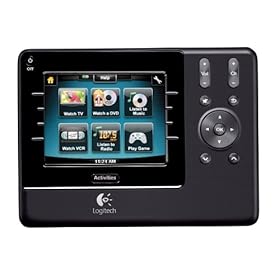
The 1100 is just over $300 or so on Amazon/eBay. Just curious is anyone has used this particular remote and has any thoughts on it. I'm already familiar with the Harmony line - like I said, have a 550 - so I'm not concerned with the programming/setup and such. Just the device itself.
I currently have a Logitech Harmony 550. LOVE IT. In the next month or so I will be upgrading the living room TV to a larger LCD (so far a 47" LG) and thus relegating the current 32" Samsung to the bedroom. I was thinking that I may upgrade my remote in the process and also relegate the Harmony 550 to the bedroom (with DVD player, Wii, PS2, etc).
I'm tempted to get the Harmony 1100 simply for its awesomeness. But the Harmony One also has a touch screen and what not - just in a different form factor and with more physical buttons.
The 1100 is just over $300 or so on Amazon/eBay. Just curious is anyone has used this particular remote and has any thoughts on it. I'm already familiar with the Harmony line - like I said, have a 550 - so I'm not concerned with the programming/setup and such. Just the device itself.
And FYI if anyone is looking... you can get 8% cashback from Bing Cashback (Bing Shopping link) on eBay purchases using Buy it Now and Paypal.
So I bought this one:
http://cgi.ebay.com/ws/eBayISAPI.dll...m=290406440133
And will get $24.something back in my Paypal account in a few weeks.
So I bought this one:
http://cgi.ebay.com/ws/eBayISAPI.dll...m=290406440133
And will get $24.something back in my Paypal account in a few weeks.
This. Remote. Is. AWESOME.
Seriously, if you have a bunch of devices and want a kick ___ universal remote to rule them all, this is the one.
Here's what I have in the living room:
- 32" LCD (soon to be replaced with 47" LG)
- Sony A/V Receiver
- HD/DVR Cable Box
- PS3
- Wii
I was previously using a Harmony 550 - this was working fine (and I'd recommend it easily as a "budget" alternative). I will soon have a new TV coming and figured a remote upgrade would be cool. Besides, the 32" LCD is going to the bedroom with and upscaling DVD player and PS2 and another Wii... might as well move the 550 in there with it.
Anyway, back to the 1100... Obviously the touchscreen is cool. It's just a 3.5" and has some physical buttons on it. You can program activities just like the other Harmony remotes... except now they show up as buttons on the touchscreen. Then you also get other menus on the touchscreen for the # keys, favorite channels (more on that in a minute) and other common functions.
The touchscreen is quite responsive. Everything seems to function just the same as the 550. The physical buttons on the 1100 are actually WAY nicer than the 550 though. Seems to be a bit higher quality (which I would hope for, for the $$). The 1100 also has a rechargable (and user-replaceable) li-ion battery. It docks on a charging cradle but still connects to the computer via USB.
I didn't even know how much customization you can do with this though... for starters, you can change the display background to whatever you want. It's just a 320x240 image of whatever. Mine is a little CF pattern at the moment. Also, you can program up to 24 favorite channels in one of the menus. Not only do you get favorite channels, but you can add custom buttons/logos to those buttons. You can get those from www.iconharmony.com. Quite awesome.
One major flaw I ran into (but many others wouldn't). Since I already had a Harmony remote, I already had the Logitech software installed and had an account created in it. When I connected this remote and tried to set it up - it would not let me simple add another remote. It made me create an entirely new account in the Logitech software (which connects to their site). And even with that new account, I couldn't add my old remote to it. So now it made me have two completely different accounts on the same software, connecting to the same website, with two different usernames.... What. The. F?
Is it really that hard to control TWO remotes with one account? I seriously can't be the only one on this planet with two Harmony remotes.
So there you go... there's my "review." Even despite the account thing... I LOVE this remote so far. If you have the money and want something awesome, this is it.
Overall Rating: 4.5 of 5
Setup: 3.5 of 5
Functionality: 5 of 5
Appeal: 5 of 5
Awesomeness: 6 of 5
Any questions?
Seriously, if you have a bunch of devices and want a kick ___ universal remote to rule them all, this is the one.
Here's what I have in the living room:
- 32" LCD (soon to be replaced with 47" LG)
- Sony A/V Receiver
- HD/DVR Cable Box
- PS3
- Wii
I was previously using a Harmony 550 - this was working fine (and I'd recommend it easily as a "budget" alternative). I will soon have a new TV coming and figured a remote upgrade would be cool. Besides, the 32" LCD is going to the bedroom with and upscaling DVD player and PS2 and another Wii... might as well move the 550 in there with it.
Anyway, back to the 1100... Obviously the touchscreen is cool. It's just a 3.5" and has some physical buttons on it. You can program activities just like the other Harmony remotes... except now they show up as buttons on the touchscreen. Then you also get other menus on the touchscreen for the # keys, favorite channels (more on that in a minute) and other common functions.
The touchscreen is quite responsive. Everything seems to function just the same as the 550. The physical buttons on the 1100 are actually WAY nicer than the 550 though. Seems to be a bit higher quality (which I would hope for, for the $$). The 1100 also has a rechargable (and user-replaceable) li-ion battery. It docks on a charging cradle but still connects to the computer via USB.
I didn't even know how much customization you can do with this though... for starters, you can change the display background to whatever you want. It's just a 320x240 image of whatever. Mine is a little CF pattern at the moment. Also, you can program up to 24 favorite channels in one of the menus. Not only do you get favorite channels, but you can add custom buttons/logos to those buttons. You can get those from www.iconharmony.com. Quite awesome.
One major flaw I ran into (but many others wouldn't). Since I already had a Harmony remote, I already had the Logitech software installed and had an account created in it. When I connected this remote and tried to set it up - it would not let me simple add another remote. It made me create an entirely new account in the Logitech software (which connects to their site). And even with that new account, I couldn't add my old remote to it. So now it made me have two completely different accounts on the same software, connecting to the same website, with two different usernames.... What. The. F?
Is it really that hard to control TWO remotes with one account? I seriously can't be the only one on this planet with two Harmony remotes.
So there you go... there's my "review." Even despite the account thing... I LOVE this remote so far. If you have the money and want something awesome, this is it.
Overall Rating: 4.5 of 5
Setup: 3.5 of 5
Functionality: 5 of 5
Appeal: 5 of 5
Awesomeness: 6 of 5
Any questions?

Thread
Thread Starter
Forum
Replies
Last Post
BlingSlade
Scion xB 1st-Gen Owners Lounge
0
Sep 5, 2015 08:52 AM
RnB180
Off-topic Cafe
4
Mar 10, 2008 11:16 PM
Taknitez
Scion xA/xB 1st-Gen Wheel & Tire
10
Jan 25, 2005 10:47 PM
