


Which CAR PC configuration do you think is better???


Thread Starter
Senior Member

SL Member
Joined: Feb 2006
Posts: 155
From: Los Angeles
 Which CAR PC configuration do you think is better???
I'm starting my Car PC soon but i'm having problems deciding on how to install the LCD touchscreen.
i listen to FM and AM radio a lot so an aftermarket HU is a must for me... Also I really really want to keep the HU Cover so that why i can't use an indash motorized lcd....
I just bought this
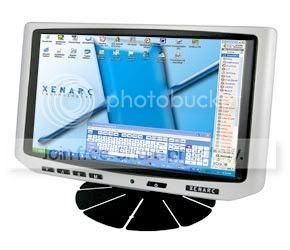
ive been researching all the different installs on WWW.MP3CARS.COM for the past years now and this is the best setup i can think of for my situation
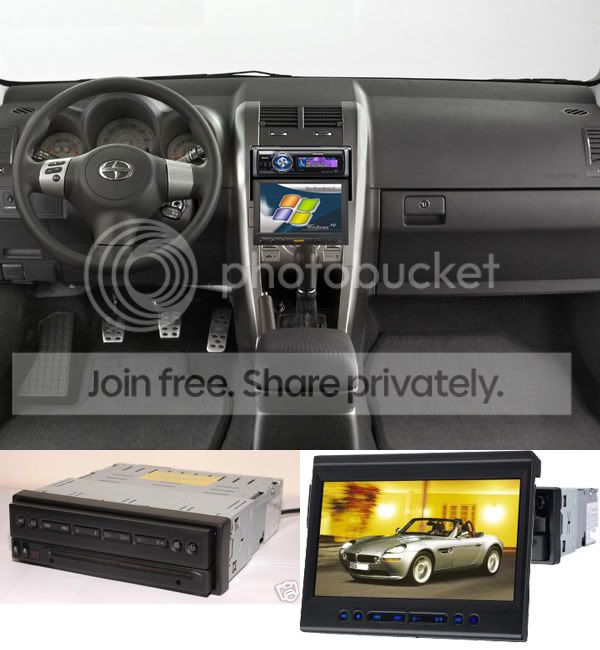
VS.
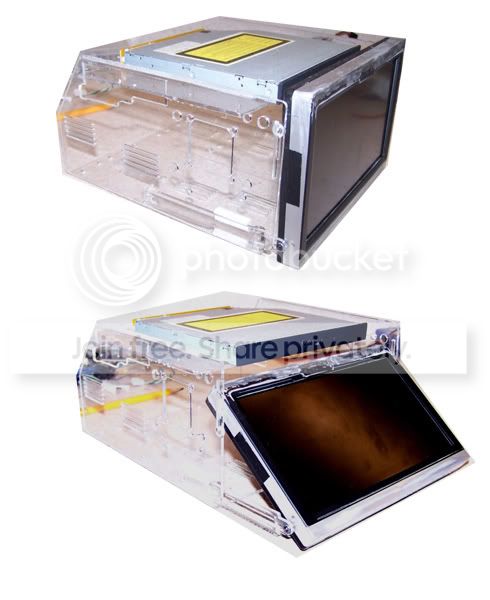
-The first setup requires the least amount of work and is easiest for me all i have to do is build a Single DIN enclosure with sliding rails attached to the LCD case which has mounts already built in so that means i won;t void the warrenty... the only bad thing i can think of is it won;t look OEM....
-The second setup is a tons more work which involves taking apart the LCD screen to fit it in a smaller housing which will void the warrenty... I would also have to extend the lcd screen out more so the lcd would lower enough to install a Single DIN HU instead of the DVD drive you see there
Anyways this is the only valid LCD installations i can think of for my situation...
so what do you guys think???
i listen to FM and AM radio a lot so an aftermarket HU is a must for me... Also I really really want to keep the HU Cover so that why i can't use an indash motorized lcd....
I just bought this
ive been researching all the different installs on WWW.MP3CARS.COM for the past years now and this is the best setup i can think of for my situation
VS.
-The first setup requires the least amount of work and is easiest for me all i have to do is build a Single DIN enclosure with sliding rails attached to the LCD case which has mounts already built in so that means i won;t void the warrenty... the only bad thing i can think of is it won;t look OEM....
-The second setup is a tons more work which involves taking apart the LCD screen to fit it in a smaller housing which will void the warrenty... I would also have to extend the lcd screen out more so the lcd would lower enough to install a Single DIN HU instead of the DVD drive you see there
Anyways this is the only valid LCD installations i can think of for my situation...
so what do you guys think???

Thread Starter
Senior Member
SL Member
Joined: Feb 2006
Posts: 155
From: Los Angeles
lol ive thought about it but i;ve never fiberglassed or bondo before and if i screw up it;s pretty much over, my car ony has 6k miles on it so it;s still a bit early for me to be destroying it lol unless i fine a bezel off another tc somewhere fabricating won;t be an option anytime soon...

Senior Member


SL Member
Joined: Jul 2005
Posts: 1,099
From: ...Lost Somewhere in Time
Why not set up your PC with an AM/FM receiver card (PCI) and wire the antenna to it? The antenna wire is just CoAx, so it is pretty simple to terminate with a BNC or threaded tip, which ever your specific PCI card requires. This way, you could ditch a headunit and use strictly the PC and just need to worry about the touchscreen.
Thread Starter
Senior Member
SL Member
Joined: Feb 2006
Posts: 155
From: Los Angeles
lol i thought about that too but the problem is the reliability of the pc... don;t get me wrong i am the biggest fan of Bill Gate's wonderful OS but even i know that it will eventually start to freeze, and shutdown occassionally... The car environment is only gonna make things worst with the limited wattage, constant bumps, and extreme temperatures compared to that of my office table...
and then theirs the issue of ease of use... i;m not the only one thats gonna be driving the car so i don;t think i want otherpeople messing with the setup... also how would i get sound out of the system wouldn;t i need like an entire new audio system???
and then theirs the issue of ease of use... i;m not the only one thats gonna be driving the car so i don;t think i want otherpeople messing with the setup... also how would i get sound out of the system wouldn;t i need like an entire new audio system???
Senior Member
SL Member
Joined: Jul 2005
Posts: 1,099
From: ...Lost Somewhere in Time
Most car-pc systems have a nice audio interface already on board with a an equivalent codec to Dolby 5.1 or even 7.1. You would have to provide some sort of amplification for the audio, but that is pretty simple to do. Using a few mini (headphone jack) to RCA conversion Y-cables and a decent multi-channel amp, you could actually have yourself a reasonable theater-quality surround sound setup in your car.
Windows environments are not exactly the most stable OS's in the world, that is for sure. You could try using Linux, but you might have some trouble getting the appropriate drivers for things such as the touchscreen support, or even the audio codec itself. I would get the system set up, allow it to run through its proper security updates and appropriate service packs, then turn off the updates and make a backup image of the system with Acronis or Ghost. That way, if you ever have issues with it, all you need to do is re-image the machine, which takes minimal time.
As for the user-friendliness of the car PC, that is a different story. You might have to give whoever else would be using your car "lessons" on proper usage of the system, or just keep it secure with some sort of login and don't allow them access to it. It might ____ 'em off a bit, but who cares?
Windows environments are not exactly the most stable OS's in the world, that is for sure. You could try using Linux, but you might have some trouble getting the appropriate drivers for things such as the touchscreen support, or even the audio codec itself. I would get the system set up, allow it to run through its proper security updates and appropriate service packs, then turn off the updates and make a backup image of the system with Acronis or Ghost. That way, if you ever have issues with it, all you need to do is re-image the machine, which takes minimal time.
As for the user-friendliness of the car PC, that is a different story. You might have to give whoever else would be using your car "lessons" on proper usage of the system, or just keep it secure with some sort of login and don't allow them access to it. It might ____ 'em off a bit, but who cares?
Thread Starter
Senior Member
SL Member
Joined: Feb 2006
Posts: 155
From: Los Angeles
im a newbie when it comes to audio in the car lol... so ur saying all i need is a decent amplifer and a sub and use the stock speakers? how is the reception of the pci radio card??? it sounds really cool but imma wait until there are more peoplle who go this route. i don;t think i wait 30 seconds for the computer to boot into windows just to listen to the radio... lol anyways all this is of big help so any comments are welcome.

Senior Member
SL Member
Joined: Mar 2005
Posts: 237
From: kansas city
I've had my carpc set up for a while now and occasionally use my radio. i've got the 7" lillput screen with a lil bondo fab on the sides

I have my aftermarket sony receiver in the back of the screen. which i control using this

the only bad thing about my set up is that you cant see the read out of the stations. however you can preset the stations on the receiver and have the ability to change station using the wired remote. Plus I think this set up gives more of an oem look and i still retain my console cover. am just waiting for internet radio to come in handy and then i would not have to worry about using my radio ever again.
I have my aftermarket sony receiver in the back of the screen. which i control using this
the only bad thing about my set up is that you cant see the read out of the stations. however you can preset the stations on the receiver and have the ability to change station using the wired remote. Plus I think this set up gives more of an oem look and i still retain my console cover. am just waiting for internet radio to come in handy and then i would not have to worry about using my radio ever again.
Senior Member
SL Member
Joined: Jul 2005
Posts: 1,099
From: ...Lost Somewhere in Time
There are PCI cards that can do AM/FM well and then there are some that have poor reception. You may need to do some research before buying, rather than just buying whatever is cheapest or readily accessible. But, if you are truly planning out a good car-pc, then you have already been doing your research, I am sure.
If you build your car-pc with enough good quality, high-speed RAM, you should be able to avoid waiting 30 seconds to boot up the pc. A small, mini-ITX unit with a good VIA processor (1.5 GHz or higher), a minimum of 1GB of memory, and a reasonably quick HDD should boot up in 10 seconds or so. If the unit will accept 2G of memory or more, do it. It will only make things that much faster.
If you build your car-pc with enough good quality, high-speed RAM, you should be able to avoid waiting 30 seconds to boot up the pc. A small, mini-ITX unit with a good VIA processor (1.5 GHz or higher), a minimum of 1GB of memory, and a reasonably quick HDD should boot up in 10 seconds or so. If the unit will accept 2G of memory or more, do it. It will only make things that much faster.


Senior Member
SL Member
Team ScioNRG
Joined: Aug 2005
Posts: 231
From: KAD - Tampa/Pinellas, FL
This is my setup, I used a single DIN flip out screen that can also swivel side to side, which is nice. I still have my headunit under it (Pioneer Premier DEH-P780), its actually the same headunit as pictured in one of the first pics above, but its under the touch screen and not above it.
Sorry for the blurry pics, haven't had a chance to take new ones yet.
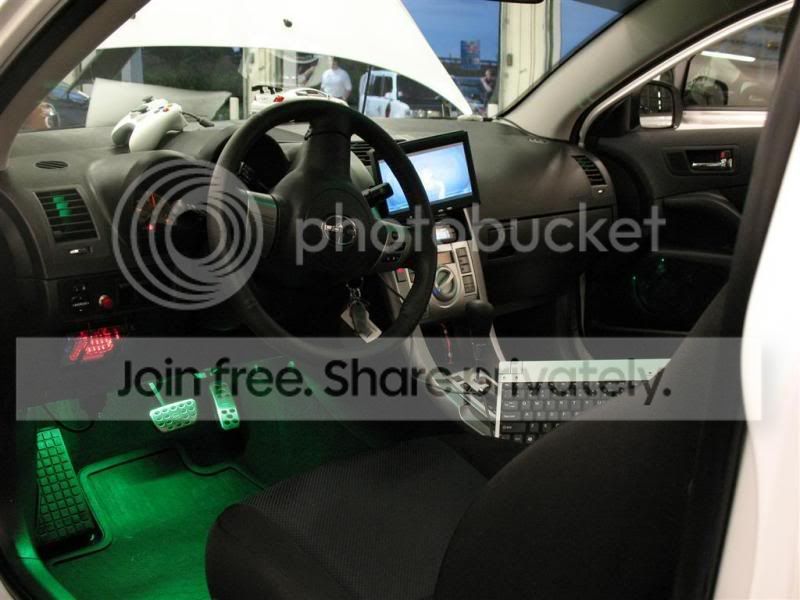
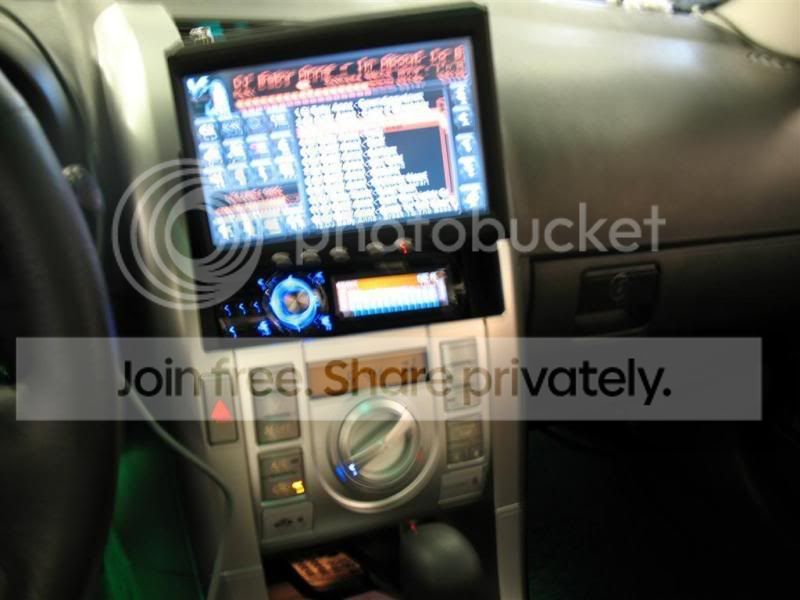
Sorry for the blurry pics, haven't had a chance to take new ones yet.

Joined: Nov 2005
Posts: 1,548
From: Nashville, TN
Re: Which CAR PC configuration do you think is better???
Originally Posted by Jowie
Originally Posted by Tekka


Senior Member
SL Member
Team ScioNRG
Joined: Aug 2005
Posts: 231
From: KAD - Tampa/Pinellas, FL
You might find this to be what you need:
http://digitalww.com/DWW-6500.htm
Its a Fip down LCD touch screen monitor with a PC DVD drive built into it. It also has an FM tuner , so you wouldn't need to keep your HU. But its pricy .
.
http://digitalww.com/DWW-6500.htm
Its a Fip down LCD touch screen monitor with a PC DVD drive built into it. It also has an FM tuner , so you wouldn't need to keep your HU. But its pricy
.

Senior Member
SL Member
Joined: Jun 2005
Posts: 246
Awww drats, guess eventually Ill have to go with my original plan of designing from scratch and having http://www.protocase.com/ build the case.
Thread Starter
Senior Member
SL Member
Joined: Feb 2006
Posts: 155
From: Los Angeles
wow that all in one design is the answer to my problem!!! Too bad its so expensive... owell perhaps one day in the future when i gots more cash....
i like your setup Borismo does your cover still work? or did u completely take it off? i thought about putting the screen on top but was afraid the door will be in it;s way...
thx guys all this is actually a big help
oh and jester28 let me know how your setup turns out that looks really interesting...
i like your setup Borismo does your cover still work? or did u completely take it off? i thought about putting the screen on top but was afraid the door will be in it;s way...
thx guys all this is actually a big help
oh and jester28 let me know how your setup turns out that looks really interesting...
Senior Member
SL Member
Team ScioNRG
Joined: Aug 2005
Posts: 231
From: KAD - Tampa/Pinellas, FL
Originally Posted by Tekka
wow that all in one design is the answer to my problem!!! Too bad its so expensive... owell perhaps one day in the future when i gots more cash....
i like your setup Borismo does your cover still work? or did u completely take it off? i thought about putting the screen on top but was afraid the door will be in it;s way...
i like your setup Borismo does your cover still work? or did u completely take it off? i thought about putting the screen on top but was afraid the door will be in it;s way...
This is the screen I got:
http://digitalww.com/DWW-700H.htm

Thread
Thread Starter
Forum
Replies
Last Post
TheTripleC
PPC: Vehicles
1
Jan 4, 2015 06:46 PM
minter66
PPC: Vehicles
0
Dec 15, 2014 01:45 PM
