


Stock HU XM Install!!!! **Pics Added**


Thread Starter
Senior Member


SL Member
Joined: Apr 2004
Posts: 107
From: Baker, FL
 Stock HU XM Install!!!! **Pics Added**
Well I finally bit the bullet and bought this (http://tinyurl.com/y9ppxs) to get XM with my stock headunit in my 04 xB without having to spend a ton of cash and rip apart my interior to install the OEM XM unit.
The install was extremely easy, both boxes (the converter and the XM tuner) take up little to no room behind the dash.
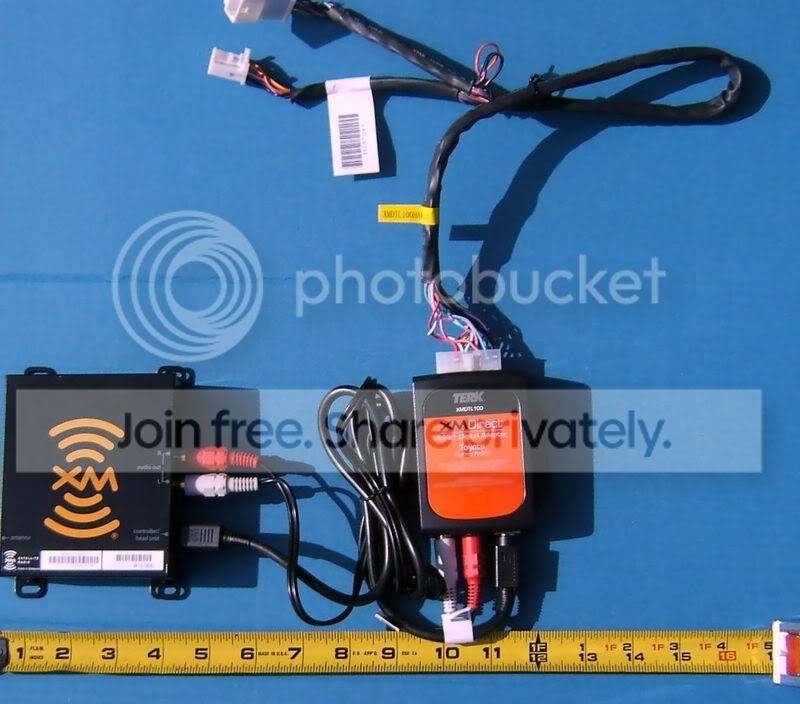
The XMDTLK unit is about the size of a deck of playing cards, and the digital tuner is about a third bigger than the converter unit.
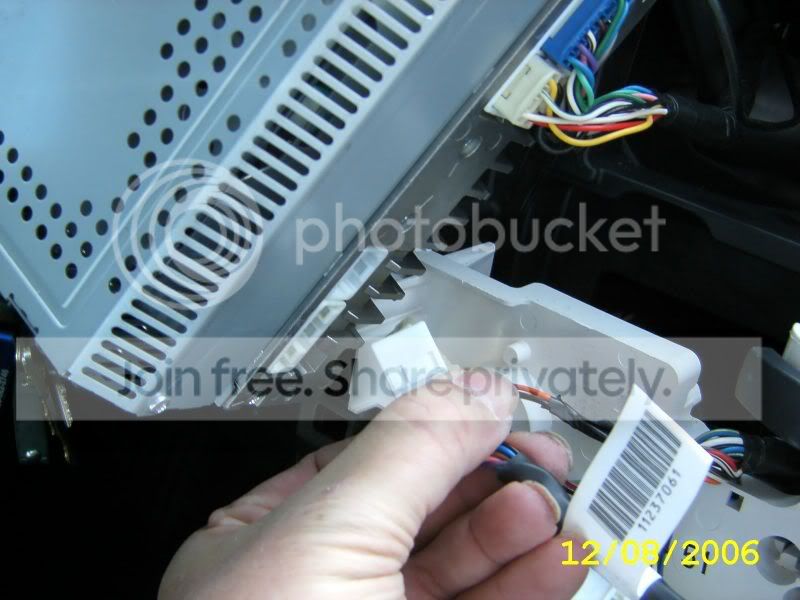
I followed the instructions found on this site to remove the dash cover and the stock HU. The hookup was all plug and play, no hassles at all, the supplied instructions are easy to read/follow!!
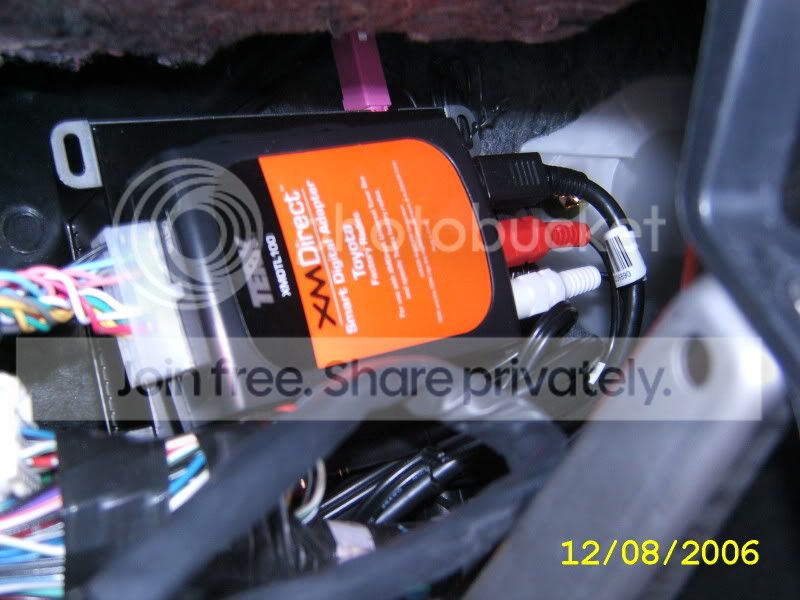
I used double stick Velcro to attach the two units together back to back. and the supplied zip ties to attach it to the dash framework behind and to the right of the stock HU.
I mounted the supplied antenna in the stock Scion xB spot.
I powered everything up and TADAAA it worked!
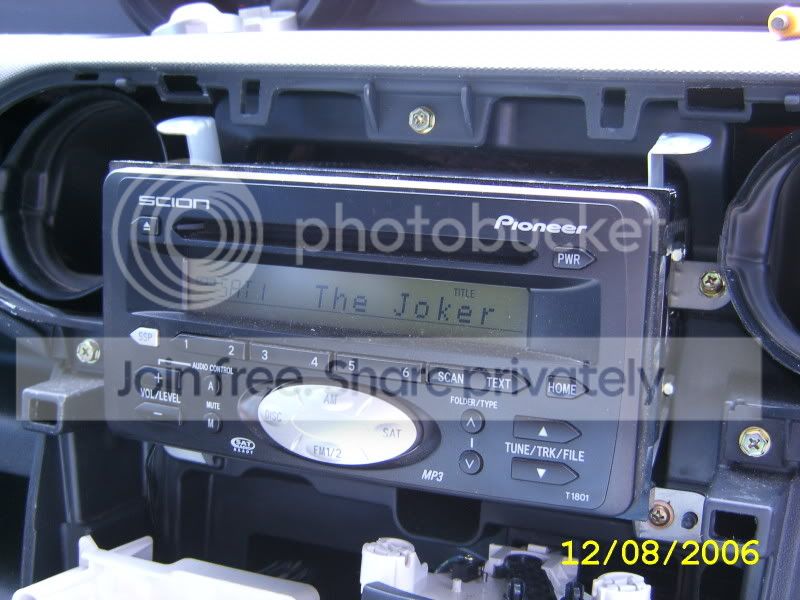
Just push the SAT button on the HU an it started playing!!!!
All and all happy with the purchace and ease of install!!
Hope this helps out everyone that has wanted XM and have it with their stock HU!
Let me know if you have any ?'s
Herb
The install was extremely easy, both boxes (the converter and the XM tuner) take up little to no room behind the dash.
The XMDTLK unit is about the size of a deck of playing cards, and the digital tuner is about a third bigger than the converter unit.
I followed the instructions found on this site to remove the dash cover and the stock HU. The hookup was all plug and play, no hassles at all, the supplied instructions are easy to read/follow!!
I used double stick Velcro to attach the two units together back to back. and the supplied zip ties to attach it to the dash framework behind and to the right of the stock HU.
I mounted the supplied antenna in the stock Scion xB spot.
I powered everything up and TADAAA it worked!
Just push the SAT button on the HU an it started playing!!!!
All and all happy with the purchace and ease of install!!
Hope this helps out everyone that has wanted XM and have it with their stock HU!
Let me know if you have any ?'s
Herb

Thread Starter
Senior Member
SL Member
Joined: Apr 2004
Posts: 107
From: Baker, FL
Originally Posted by PatD
the link doesn't work.
 It's working now!
I'm working on pics as the install of the antenna inside has periodic signal problems and I'll be moving it outside!
Stay tuned....


Senior Member


SL Member
Joined: Dec 2004
Posts: 4,971
From: Atlanta, GA
Originally Posted by joshleon
Nice!
Is the XM worth it? Or would the iPod accesory work better?
Is the XM worth it? Or would the iPod accesory work better?


Senior Member
SL Member
Joined: Jun 2006
Posts: 350
From: Hilton Head, SC
So how do you like now that you have been using it awhile? Any problems? Does the antenna mount on the outside of the car? Also, does the name of the song or artist show up on the radio's display?

Member
Joined: Jul 2006
Posts: 43
From: Tampa, Florida
Originally Posted by Max
Originally Posted by joshleon
Nice!
Is the XM worth it? Or would the iPod accesory work better?
Is the XM worth it? Or would the iPod accesory work better?
Does XM have enough of a programming kick to not get boring? Like are there stations for all tastes, even say people who listen to computerized jpop or yoddeling?
Originally Posted by keg79
where do you get the ipod wiring to connect to factory head unit without spending dealer prices?
Thread Starter
Senior Member
SL Member
Joined: Apr 2004
Posts: 107
From: Baker, FL
Originally Posted by samhain
So how do you like now that you have been using it awhile? Any problems? Does the antenna mount on the outside of the car? Also, does the name of the song or artist show up on the radio's display?
 So far so good! The only problem I had was with antenna placement, initally I had it on the dash between the speedo and windshield, and had problems with loss of signal. Since I moved it outside (near the stock location for the xB) and have had no problems with signal loss!
For less than $100.00 for both the tuner and converter box IMO a great deal!
As shown in one of the above pics the name of the song shows up (The Joker by Steve Miller was playing when I took the pic).
All controlls for tuning, station preset and othe items are completely handled by the STOCK H/U.
I very happy with it!
Thread Starter
Senior Member
SL Member
Joined: Apr 2004
Posts: 107
From: Baker, FL
Originally Posted by Gamecat
I have a PIE aux in adapter already... I'm assuming I wouldn't be able to have both of these together would I?
If anyone else hase more info (or corrections) please chime in, I am by no means an expert on all things (yet
)Have at it!

Member
SL Member
Joined: Oct 2006
Posts: 84
From: Philly
Well, I wouldn't need the unti to control the device hooked up to my PIE adaptor, I was just hoping the two adaptors would be able to work at the same time...
Well, not literally at the same time.. but you know what I mean. :p
Well, not literally at the same time.. but you know what I mean. :p
Thread Starter
Senior Member
SL Member
Joined: Apr 2004
Posts: 107
From: Baker, FL
Wellp,
If the adapter plugs in in a defferent location on the back of the H/U you might be in luck!
It then may be possible to change between the two units!
What control button do you push on the H/V to get the PIE unit to work?
If the adapter plugs in in a defferent location on the back of the H/U you might be in luck!
It then may be possible to change between the two units!
What control button do you push on the H/V to get the PIE unit to work?
Member
SL Member
Joined: Oct 2006
Posts: 84
From: Philly
The CD button.
It uses the CD changer port...
On the PIE website it says it won't work with the factory XM option... hrmm which leads me to believe the two are incompatible... But I wonder if this device is considered a factory XM option... :-/
It uses the CD changer port...
On the PIE website it says it won't work with the factory XM option... hrmm which leads me to believe the two are incompatible... But I wonder if this device is considered a factory XM option... :-/
Thread Starter
Senior Member
SL Member
Joined: Apr 2004
Posts: 107
From: Baker, FL
Again for what its worth, after I connected the Terk (XMDTLK) I use the SAT button to display and use the XM Radio.
Without having the PIE unit I cant give the definitive Yea or Nay!
Without having the PIE unit I cant give the definitive Yea or Nay!

Junior Member
Joined: Nov 2006
Posts: 2
hehe
I finally got mine installed today. After mulling over all of the directions I could find online, I decided to have it professionally installed. I didn't want to mess up my tC or have stuff rattling around or whatever. I think the colder weather dissuaded me too.
When I came to update the other thread, I saw this one. Congrats and enjoy!
I finally got mine installed today. After mulling over all of the directions I could find online, I decided to have it professionally installed. I didn't want to mess up my tC or have stuff rattling around or whatever. I think the colder weather dissuaded me too.
When I came to update the other thread, I saw this one. Congrats and enjoy!