


My Carputer Setup


Thread Starter


Joined: Sep 2005
Posts: 3,314
From: HMFIC Jensen Beach, FL
 My Carputer Setup
So I've been wanting a carputer forever. I had one like five years ago in my Buick and it was real ghetto style with a full tower in the trunk and using a PSone portable screen.lol It worked and was nice for being in a '91 Buick but now I'm doing it right.
I'm a computer tech so I got a lot of the stuff and can get alot at a good price. I'll keep this updated as the parts get in and ordered.
This is what I got...
ASUS P5N-EM HDMI LGA 775 NVIDIA GeForce 7100/nForce 630i HDMI Micro ATX Intel Motherboard LGA 775 Motherboard
APEX DM-317-A Black/ Silver Steel MicroATX Slim Case
512mb DDR2 800
GlobalSat BU-353 USB GPS Receiver
External USB Slot Loading Panasonic UJ 845 DUAL Layer DVD R/RW
P4 3.8GHz
Hard Drive 160GB samsung 3.5" IDE (will change later SATA 2.5")
Mp3Car DSATX 220 Watt Automotive Power Supply
2008 Lilliput 7" VGA Touchscreen 629GL-70NP LED Backlight
I'm a computer tech so I got a lot of the stuff and can get alot at a good price. I'll keep this updated as the parts get in and ordered.
This is what I got...
ASUS P5N-EM HDMI LGA 775 NVIDIA GeForce 7100/nForce 630i HDMI Micro ATX Intel Motherboard LGA 775 Motherboard
APEX DM-317-A Black/ Silver Steel MicroATX Slim Case
512mb DDR2 800
GlobalSat BU-353 USB GPS Receiver
External USB Slot Loading Panasonic UJ 845 DUAL Layer DVD R/RW
P4 3.8GHz
Hard Drive 160GB samsung 3.5" IDE (will change later SATA 2.5")
Mp3Car DSATX 220 Watt Automotive Power Supply
2008 Lilliput 7" VGA Touchscreen 629GL-70NP LED Backlight

Thread Starter
Joined: Sep 2005
Posts: 3,314
From: HMFIC Jensen Beach, FL
Originally Posted by TylerC08
ASUS mobo FTW, SLI capabilities?
Just finished ordering the monitor and psu with controller. So I should have everything by the weekend.


Thread Starter
Joined: Sep 2005
Posts: 3,314
From: HMFIC Jensen Beach, FL
Can anyone point me to how to go about relocating the factory head unit to the glove box? I searched but can't seem to find a howto. I really don't want to cut into the factory harness but if that's what I got to do then I have to do it.
Thread Starter
Joined: Sep 2005
Posts: 3,314
From: HMFIC Jensen Beach, FL
Been awhile but everything is here. I've had everything for awhile but just been too busy.
I have the computer together with a regular power supply and I installed xp and tweaked it removing services and other crap that's not needed. I have the bootup time down to 37 to 42secs. I'm having a problem where it takes about 8-9secs just for the POST to start. I've never seen this before but will figure it out.
I need to know the best way to terminate the power and ground at the battery. I know I can get like some battery terminals like audio guys use but not sure what to do about when I want to run my audio wires to the battery later on or power for lights. Any suggestions? Also it looks like these terminals are different sizes, what size does the tc take for stock battery?
Thanks, more updates to come as I'm doing as much as I can this weekend.
I have the computer together with a regular power supply and I installed xp and tweaked it removing services and other crap that's not needed. I have the bootup time down to 37 to 42secs. I'm having a problem where it takes about 8-9secs just for the POST to start. I've never seen this before but will figure it out.
I need to know the best way to terminate the power and ground at the battery. I know I can get like some battery terminals like audio guys use but not sure what to do about when I want to run my audio wires to the battery later on or power for lights. Any suggestions? Also it looks like these terminals are different sizes, what size does the tc take for stock battery?
Thanks, more updates to come as I'm doing as much as I can this weekend.

Thread Starter
Joined: Sep 2005
Posts: 3,314
From: HMFIC Jensen Beach, FL
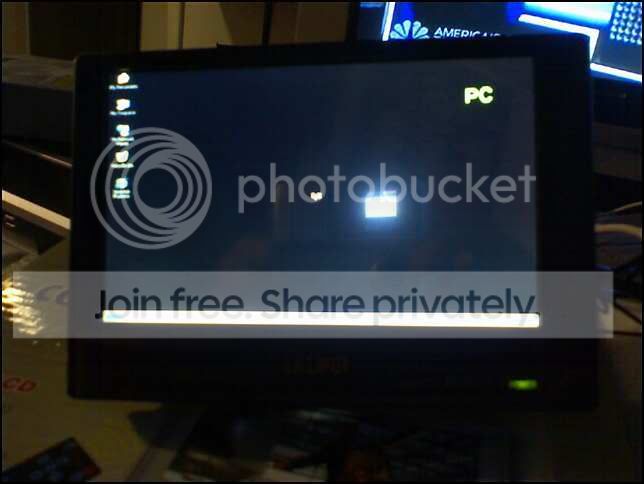
Here's all I got so far. I ordered a part to mount my screen in so it's nice in the 2din hole and will still be able to open and close the radio door. Here's a link to the part and a pic of the monitor. http://www.mechatroniks.com/wrx/ordering.html

Thread Starter
Joined: Sep 2005
Posts: 3,314
From: HMFIC Jensen Beach, FL
Originally Posted by SengTC3
why only 512mb of ram?

Senior Member

SL Member
Joined: Mar 2005
Posts: 237
From: kansas city
i'll love to see your this finish product. Along with the headache, carpc is just a neat thing to have.
I also have a carpc but I decided to go with an aftermarket head unit instead of the factory. that gave me enough space to place the head unit behind the screen.
About the small size ram, it helps when you want to do the hibernating route. So the smaller the ram size the quicker you resume from hibernating and thus quicker ur music starts.
I also have a carpc but I decided to go with an aftermarket head unit instead of the factory. that gave me enough space to place the head unit behind the screen.
About the small size ram, it helps when you want to do the hibernating route. So the smaller the ram size the quicker you resume from hibernating and thus quicker ur music starts.
Thread Starter
Joined: Sep 2005
Posts: 3,314
From: HMFIC Jensen Beach, FL
^ Yeah I've read you're posts a few times over the last year maybe even two.lol
I'm gonna be going with an aftermarket head unit eventually. I'll have the unit maybe behind the screen or in glovebox and the face of it mounted like up by the front dome light so it will look like a spaceship or something.lol
I'm gonna be going with an aftermarket head unit eventually. I'll have the unit maybe behind the screen or in glovebox and the face of it mounted like up by the front dome light so it will look like a spaceship or something.lol
Thread Starter
Joined: Sep 2005
Posts: 3,314
From: HMFIC Jensen Beach, FL
Got the 2 din bezel in today and pulled the monitor out of the case and mounted it in the bezel. Now I just got to slide it in the 2 din spot and run all the wires. As I look at this pic I realize everyone now knows I watch Big Brother.lol


Thread Starter
Joined: Sep 2005
Posts: 3,314
From: HMFIC Jensen Beach, FL
Yep 2din and going in the radio hole and radio will go in the glovebox. Eventually will get a aftermarket radio and put the face like up by the dome light.

 interesting. Keep us posted.

Senior Member
SL Member
Joined: Aug 2006
Posts: 394
Hey man, did you figure out how to move the stock HU? I have a carPC too and my HU is in the glove box. I had someone around here do a custom mount for me a few years back.
I thought about offering to come over and give you a hand but I think you're over an hour away from me. But if you want you're welcome to come down south and I can help you out.
I thought about offering to come over and give you a hand but I think you're over an hour away from me. But if you want you're welcome to come down south and I can help you out.

Member
SL Member
Scion Evolution
Joined: Dec 2004
Posts: 99
From: The Neon Jungle Las Vegas
instead of replying in the messege u sent me i thought it would be helpful for others that is interested in the project.
https://www.scionlife.com/forums/vie...239&highlight=
the angle was made because the screen is behind the console. added filler and just used sandpaper to shape (i still have more filling/shaping to do).
why keep the stock hu?
if its for the radio, why do have a carpc?
if its for sound, finish the carpc setup hahahaha use your amps
https://www.scionlife.com/forums/vie...239&highlight=
the angle was made because the screen is behind the console. added filler and just used sandpaper to shape (i still have more filling/shaping to do).
why keep the stock hu?
if its for the radio, why do have a carpc?
if its for sound, finish the carpc setup hahahaha use your amps