


Kenwood DDX712 Custom Start up Screen


Thread Starter
Member

SL Member
Joined: Oct 2006
Posts: 59
From: North Carolina
 Kenwood DDX712 Custom Start up Screen
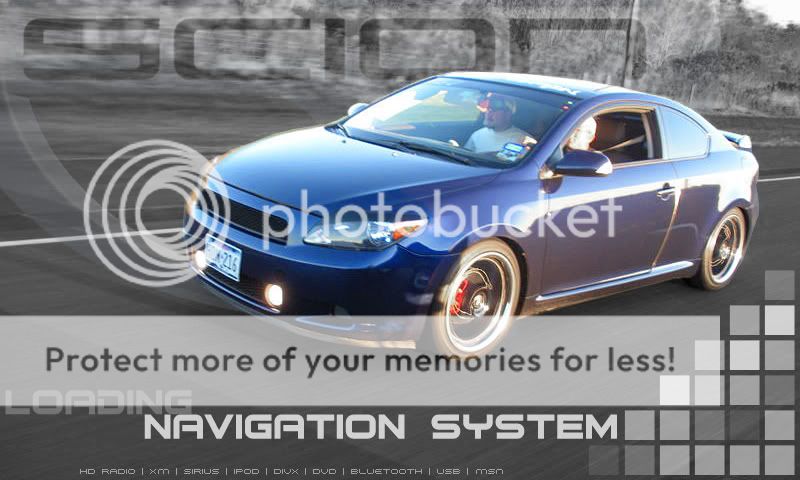
Wanted to share a little trick I found concerning Kenwoods with monitors (double din and flip outs) which allows you to change the start up screen from the quirky Kenwood one to whatever you want. Below is the directions I found as well as a link to the file needed and a picture of my DDX712 starting up:
To enter setup Mode, Press and hold FNC & EJECT keys, then press RESET Key.
· Release reset key, and hold FNC & EJECT Key until illumination activates.
· Connect the USB Thumb drive containing image file and convert program. All files must be in the root directory.
· There is no extension on the convert program.
· If you want to change the opening image to your own image (i.e., company logo), Press OEM Image.
· The OEM Image will be grayed out till files are seen on USB device.
· If you want to put original KENWOOD opening back, press KENWOOD image.
· Select the image you want to use.
· When the image is loaded, select Enter Your new opening will remain for few seconds and then switch to the Source Select menu.
· Power down and power up, the new picture should stick

http://www.dfwcorvettes.com/files/convert.zip
Unzip the file and ensure it is on the USB drive you are using to load the custom start up picture
Also, it is best to design the picture at 480x270 then resize the height in photoshop to 480x234 because for some reason, the head unit will stretch the height on its own.
To enter setup Mode, Press and hold FNC & EJECT keys, then press RESET Key.
· Release reset key, and hold FNC & EJECT Key until illumination activates.
· Connect the USB Thumb drive containing image file and convert program. All files must be in the root directory.
· There is no extension on the convert program.
· If you want to change the opening image to your own image (i.e., company logo), Press OEM Image.
· The OEM Image will be grayed out till files are seen on USB device.
· If you want to put original KENWOOD opening back, press KENWOOD image.
· Select the image you want to use.
· When the image is loaded, select Enter Your new opening will remain for few seconds and then switch to the Source Select menu.
· Power down and power up, the new picture should stick
http://www.dfwcorvettes.com/files/convert.zip
Unzip the file and ensure it is on the USB drive you are using to load the custom start up picture
Also, it is best to design the picture at 480x270 then resize the height in photoshop to 480x234 because for some reason, the head unit will stretch the height on its own.


Thread Starter
Member
SL Member
Joined: Oct 2006
Posts: 59
From: North Carolina
Originally Posted by smilezdc
oh wow.. is this just the startt up screen? is there a trick for the background?


Thread Starter
Member
SL Member
Joined: Oct 2006
Posts: 59
From: North Carolina
I really like that start up screen. Looks more professional than mine. I decided to go with the companies logos I have used vs having the stickers all over the car itself. Here is what mine looked like before loading on the head unit:


Thread
Thread Starter
Forum
Replies
Last Post
mw1957
Scion xA/xB 1st-Gen Drivetrain & Power
4
Mar 16, 2015 06:00 PM
CONCRETETC
PPC: Interior / Electronics
1
Feb 9, 2015 08:05 PM
Beesh
Scion xA/xB 1st-Gen ICE & Interior
3
Jan 9, 2015 06:30 PM
lunchbx05
PPC: Interior / Electronics
0
Dec 11, 2014 06:13 PM
