


Nexus 7 Installation (Picture overload)


Thread Starter
Member
SL Member
Joined: Dec 2012
Posts: 55
 Nexus 7 Installation (Picture overload)
So before I start with the pictures and story, I'd like to thank O_O for all of the help (and inspiration) he gave me. Major props to O_O for the help and constant answering of questions.
Now on to the project. I always felt like the stock stereo was missing a little something and I hated how when I had a flash drive connected, it would sort the songs by Date Modified, instead of in alphabetical order, and since I'm terrible with directions, and I needed a navigation, and figured it was incredibly unsafe to be using my phone for directions. So, I set out to find if anyone had installed an Android tablet (I'm an Android developer so no Apple products here) in their TC. I have a Nexus 7 tablet and found myself using it less and less over the months, so I thought why not stick it in my car? After some initial research, I originally wanted to try and remove the stock stereo altogether, and hook up an amp and speakers directly to the Nexus, but it took too much work, and I wanted something a little simpler. That's where O_O came in. I took a look at his thread, built up the courage to rip out my dash, and install the Nexus 7. Now it required a lot more sanding and cutting than I was hoping for, but I think it paid off, and it's awesome knowing that I have a 16gb tablet in my dash. I was able to run an aux cable and USB cable (for power) down behind the stereo, and still be able to use my steering wheel controls for volume adjustment. I used an app called Car Widget so that controls are a lot easier to push instead of having to search for small buttons on the screen while driving. For GPS and any data-requiring apps, I tether my phone (Galaxy Nexus) and that works perfectly.
Anyways, TL:DR, I installed a Nexus 7 in my dash and now have access to Google Navigation, Pandora, YouTube, Songza, etc... all at the touch of a finger. Here's the pictures! (Please excuse the cell phone quality of the pictures)
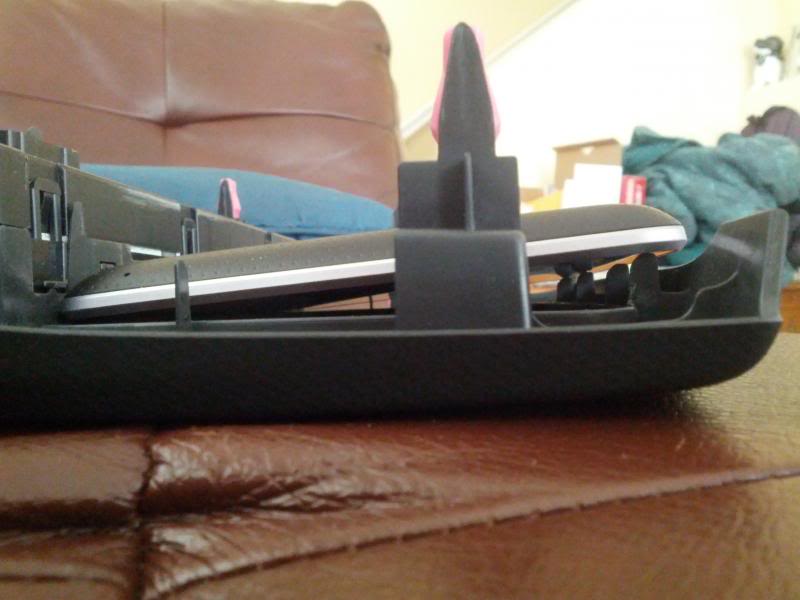
The N7 was too wide, and these tabs were a pain in my butt.



After a ton of sanding down the bezel tabs, time to attempt the install

Seems to be working pretty well
Google Navigation

Lockscreen

Music Player

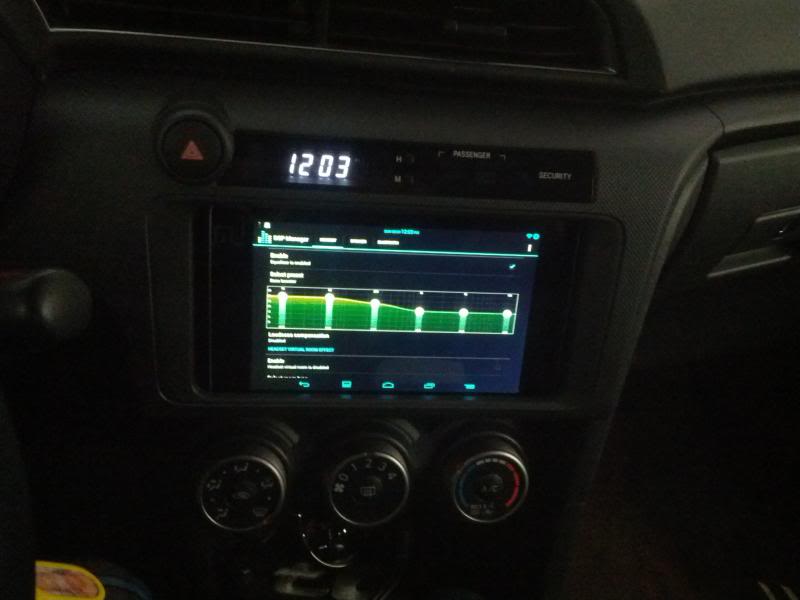
Music Equalizer
Pandora

Calculator (for gas mileage). I also use the FuelLog app though

iHeartRadio and TuneIn Radio are apps used to listen to the radio if I ever choose to

YouTube (for the passengers)

My old user interface

USB and AUX for power and audio, respectively, coming through the traction control button

How it looks when I take the tablet out (I no longer use those gold brackets, no need for them)

I recently got a new, thicker aux cable and sound quality is much better now. Thanks to the equalizer and this cable, audio is much better than the stock stereo

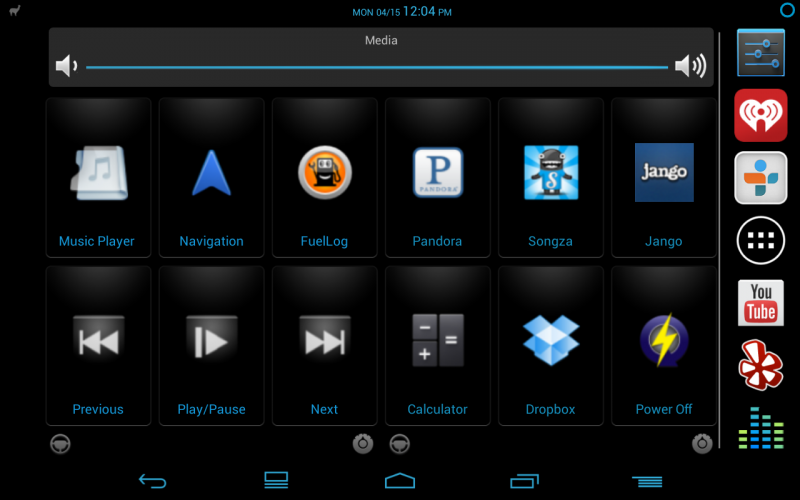
My current UI (much cleaner)
Random picture of my car

You probably noticed in some of the pictures, there's 3 pieces of tape and 2 gold brackets holding the tablet in place. Those are no longer necessary, so it looks completely stock, other than the gaps on the side. I'm planning on sticking some black/gray plastic or foam or something in there to keep it clean looking.
Let me know what you guys think. Thanks for looking!
Now on to the project. I always felt like the stock stereo was missing a little something and I hated how when I had a flash drive connected, it would sort the songs by Date Modified, instead of in alphabetical order, and since I'm terrible with directions, and I needed a navigation, and figured it was incredibly unsafe to be using my phone for directions. So, I set out to find if anyone had installed an Android tablet (I'm an Android developer so no Apple products here) in their TC. I have a Nexus 7 tablet and found myself using it less and less over the months, so I thought why not stick it in my car? After some initial research, I originally wanted to try and remove the stock stereo altogether, and hook up an amp and speakers directly to the Nexus, but it took too much work, and I wanted something a little simpler. That's where O_O came in. I took a look at his thread, built up the courage to rip out my dash, and install the Nexus 7. Now it required a lot more sanding and cutting than I was hoping for, but I think it paid off, and it's awesome knowing that I have a 16gb tablet in my dash. I was able to run an aux cable and USB cable (for power) down behind the stereo, and still be able to use my steering wheel controls for volume adjustment. I used an app called Car Widget so that controls are a lot easier to push instead of having to search for small buttons on the screen while driving. For GPS and any data-requiring apps, I tether my phone (Galaxy Nexus) and that works perfectly.
Anyways, TL:DR, I installed a Nexus 7 in my dash and now have access to Google Navigation, Pandora, YouTube, Songza, etc... all at the touch of a finger. Here's the pictures! (Please excuse the cell phone quality of the pictures)
The N7 was too wide, and these tabs were a pain in my butt.


After a ton of sanding down the bezel tabs, time to attempt the install

Seems to be working pretty well
Google Navigation

Lockscreen

Music Player

Music Equalizer

Pandora

Calculator (for gas mileage). I also use the FuelLog app though

iHeartRadio and TuneIn Radio are apps used to listen to the radio if I ever choose to

YouTube (for the passengers)

My old user interface

USB and AUX for power and audio, respectively, coming through the traction control button

How it looks when I take the tablet out (I no longer use those gold brackets, no need for them)

I recently got a new, thicker aux cable and sound quality is much better now. Thanks to the equalizer and this cable, audio is much better than the stock stereo

My current UI (much cleaner)

Random picture of my car

You probably noticed in some of the pictures, there's 3 pieces of tape and 2 gold brackets holding the tablet in place. Those are no longer necessary, so it looks completely stock, other than the gaps on the side. I'm planning on sticking some black/gray plastic or foam or something in there to keep it clean looking.
Let me know what you guys think. Thanks for looking!

Member
SL Member
Joined: Jun 2011
Posts: 78
Wow! That's awesome I just now saw this thread. Super late too haha. I love the UI you have for it, it makes it look stock (in a good way). I definitely like how it looks much better with a completely flat and all glass screen than mine with the bezel. And once you get those side gaps filled in it'll look even better. Glad it all worked out in the end! Maybe someday I'll be upgrading mine to a Nexus 7 


I love my nexus. I would like to find a way to do some sort of temporary mount. Like have inconspicuous clips poking out from the bezel and I can place my Nexus 7 on it so it sort of covers the radio when I want to use it.
BTW have you tried any G-Force or Speed apps? I know iOS has some that will measure Acceleration and G-force.
Very nice setup. I will study your post again after work.
BTW have you tried any G-Force or Speed apps? I know iOS has some that will measure Acceleration and G-force.
Very nice setup. I will study your post again after work.
Thread Starter
Member
SL Member
Joined: Dec 2012
Posts: 55
Wow! That's awesome I just now saw this thread. Super late too haha. I love the UI you have for it, it makes it look stock (in a good way). I definitely like how it looks much better with a completely flat and all glass screen than mine with the bezel. And once you get those side gaps filled in it'll look even better. Glad it all worked out in the end! Maybe someday I'll be upgrading mine to a Nexus 7
I love my nexus. I would like to find a way to do some sort of temporary mount. Like have inconspicuous clips poking out from the bezel and I can place my Nexus 7 on it so it sort of covers the radio when I want to use it.
BTW have you tried any G-Force or Speed apps? I know iOS has some that will measure Acceleration and G-force.
Very nice setup. I will study your post again after work.
BTW have you tried any G-Force or Speed apps? I know iOS has some that will measure Acceleration and G-force.
Very nice setup. I will study your post again after work.
It slides in and out from the bottom because there is a gap down there and on the sides. All I need to do is pull the bezel out a bit, and the Nexus slides right out. Disconnect the cables and I'm good to go. Same process for putting it back in. Only takes a few seconds to get it out, and about 10-15 to put it back in. No rattle at all though. I've taken it on some bumpy roads (even drove from LA to Vegas and back) to make sure it wouldn't fall out, and haven't had a single issue yet.


Thread Starter
Member
SL Member
Joined: Dec 2012
Posts: 55
Unfortunately the battery does drain slowly over time. The USB cable is simply to slow down the discharge, because there is no way (that I've found) to have the Nexus get tricked into thinking that the USB charge is the same as a wall plug.

Junior Member
Joined: Aug 2013
Posts: 3
Thanks for the quick reply! I've been trying to figure this one out for a week or two now. "Timur's USB rom" was I thought would work, but no success. Franco's kernel!... That didn't work either lol. The best way I've tried so far is to turn the screen off and then it charges...slowly. Having the screen off the entire time and driving it, kinda defeats the purpose of it.
Otherwise, it was really cool. If i could solve this ONE problem, everything will be fine and I can make it a perma install.

Member
SL Member
Joined: Jun 2013
Posts: 50
I have done this exact same thing to my tC and experienced the exact same problem. What you need to do is to find a charger that runs off DC power (a car charger) meant specifically for tablets. It will be a 3.3 amp charger. Then what you need to do is either get a "dumb" USB cord,(only meant for charging, no data transmisson) as this has a much higher flow rate than your standard USB cable. I can also teach you how to make a standard USB cable a high-flow USB cable. (It is a simple mod, takes 5 min)
Junior Member
Joined: Aug 2013
Posts: 3
I have done this exact same thing to my tC and experienced the exact same problem. What you need to do is to find a charger that runs off DC power (a car charger) meant specifically for tablets. It will be a 3.3 amp charger. Then what you need to do is either get a "dumb" USB cord,(only meant for charging, no data transmisson) as this has a much higher flow rate than your standard USB cable. I can also teach you how to make a standard USB cable a high-flow USB cable. (It is a simple mod, takes 5 min)
At the moment, I have "PowerGen Black 3.6Amps / 18W Dual USB Car charger"

Though, I didn't hear about this USB hack, I would like try it out. It does say that its "AC charging" when I plug into this with OEM cable and it doesn't charge unless the screen is off.
Member
SL Member
Joined: Jun 2013
Posts: 50
Thanks for the suggestions, I almost gave up on this setup.
At the moment, I have "PowerGen Black 3.6Amps / 18W Dual USB Car charger" Amazon.com: PowerGen Black 3.6Amps / 18W Dual USB Car charger Designed for Apple and Android Devices: Cell Phones & Accessories
Though, I didn't hear about this USB hack, I would like try it out. It does say that its "AC charging" when I plug into this with OEM cable and it doesn't charge unless the screen is off.
At the moment, I have "PowerGen Black 3.6Amps / 18W Dual USB Car charger" Amazon.com: PowerGen Black 3.6Amps / 18W Dual USB Car charger Designed for Apple and Android Devices: Cell Phones & Accessories
Though, I didn't hear about this USB hack, I would like try it out. It does say that its "AC charging" when I plug into this with OEM cable and it doesn't charge unless the screen is off.


Thread
Thread Starter
Forum
Replies
Last Post
gyiu
Regional - Pacific South
12
Feb 20, 2015 04:20 PM
minter66
PPC: Vehicles
0
Dec 15, 2014 01:45 PM
TheRedBox
Scion xA/xB 1st-Gen Drivetrain & Power
31
Dec 2, 2003 04:53 PM
